
XWeb Pros · Merchant Services
Make Getting Paid Fit the Way You Do Business.
Payment solutions that fit how you sell
We help you explore payment solutions that fit the way you sell—at the counter, online, or on the go—and connect with your customers, website, and daily operations.
Equipment photos are examples from XWebPay. Interface cards are invented. A discovery request is not a merchant account application.
Payment request
$85.00
Sent as a link. Sample only, no code to scan.
Ways to pay
Payment options by business need
In person
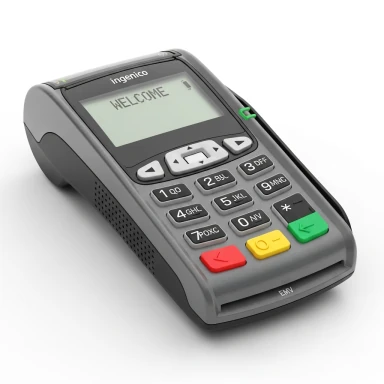
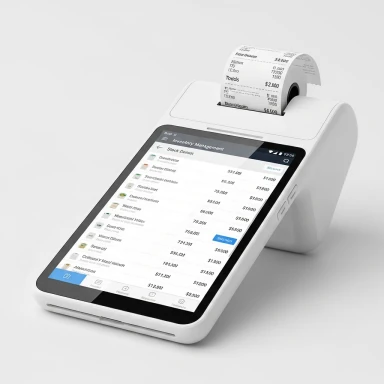
Card-present acceptance may call for a counter terminal, a handheld device or an all-in-one POS setup. Contactless acceptance is an option where supported. Hardware availability, provider fit and features must be confirmed for your business.
Contactless acceptance works on eligible devices and providers only.
Online
A store checkout, payment gateway or virtual terminal can support different online and keyed-payment workflows. We review platform compatibility, provider requirements and who handles payment data before proposing an integration.
Mobile
For transactions away from a fixed counter, phone-based Tap to Pay and portable terminals are categories to explore. Device eligibility, network access and the available provider configuration vary.
Recurring
For repeat invoices, subscriptions or other authorized payments, discuss card billing or ACH/eCheck options. Customer authorization, transaction handling and settlement timing depend on the selected provider and applicable terms.
Invoice and payment link
Send a customer a payment request they can open on their own device. A payment link is a web request, not a contactless tap on a terminal. Whether invoicing or hosted payment pages are available depends on the selected provider.
ACH/eCheck bank payments
XWebPay describes ACH/eCheck bank-transfer options, including recurring use. Customer authorization, provider capabilities and applicable terms apply. ACH does not use the same card authorize-then-capture steps.
Walkthrough
See the Payment Experience in Action
Three short demonstrations with fictional details. Pick one, then play it or step through it.
Payment Demo — No Real Transaction
- Roasted beans 12 oz (sample)$14.00
- Oat cookie (sample)$4.50
- Total$18.50
The purchase appears with its total. Nothing has been charged.
Confirmation
Tells the customer the payment was accepted or declined.
Settlement
Funds become available in the provider’s balance. Bank payout is a separate step; timing varies by provider.
Bank deposit
When funds reach the merchant’s bank account. A confirmation alone does not mean this has happened. No timeline is promised here.
Equipment
The Right Setup for Where You Sell
Genuine equipment examples by category, plus mobile payment options.
Countertop terminals
Typical settings
Retail counters, front desks, service windows
- A fixed device at the point of sale
- Card-present checkout where customers visit
- Contactless only where the device and provider support it
Category shown for conversation. No model, specification, price or compatibility is promised.
Equipment examples from XWebPay; current models and availability confirmed in discovery. Source: XWebPay
By business type
How Does Your Business Get Paid?
Pick the example closest to yours.
Payment scenario
A shopper pays at the counter, then orders a refill online later.
Categories to discuss
- Countertop or POS category
- Online checkout
- Gift and loyalty options, provider dependent
A starting point for conversation. It is not an eligibility decision or an equipment recommendation.
- 1Scan items
- 2Tap or insert card
- 3Receipt
Payment interest: In person and online
After the payment
Connect the Payment With What Happens Next
Customer Payment
The moment a customer chooses how to pay: at a terminal, in a checkout or from a request.
Order total
$38.00
Method: sample card
Websites
Checkout and order pages can pass payment status to your site, depending on provider and platform.
Customer accounts
A portal could show invoices or payment status where the systems allow it.
Invoicing
Invoice status can be matched to payments, depending on the tools chosen.
Reporting
Provider reports can feed reconciliation. Their form varies by provider.
Which connections are possible depends on the selected provider and your business systems. No savings are claimed.
Reporting
See the Activity Behind Your Payments
Authorized only (not captured)
$76.00
Captured (card)
$260.50
Refunded
$56.50
Captured minus refunded
$204.00
| ID | Method | Amount | Captured | Refunded |
|---|---|---|---|---|
| T-1041 | Card | $48.00 | $48.00 | $0.00 |
| T-1042 | Card | $129.50 | $129.50 | $32.50 |
| T-1043 | Card | $76.00 | $0.00 | $0.00 |
| T-1044 | Card | $24.00 | $24.00 | $24.00 |
| T-1045 | ACH | $180.00 | $0.00 | $0.00 |
| T-1046 | Card | $59.00 | $59.00 | $0.00 |
- Authorized
- A hold on the card for an amount. Not yet collected, so not counted as captured.
- Captured
- The collection step is completed. It is not a bank deposit.
- Refunded
- An amount returned, up to the captured original.
- Settled
- Reflected in the provider’s settlement or balance. Your bank payout is separate.
Terminology reference: holds, refunds, balances (Stripe documentation, general terms only; no partnership implied). ACH does not use this card authorize-then-capture flow. Fictional sample data, a general example and not every provider offers the same dashboard. Not client results, no live account, no funding timeline.
Start with where you sell
Do you take payments at a counter, through a website, on the move or by invoice? Identify what is difficult now: a disconnected checkout, duplicate entry, an unclear billing process or equipment that no longer matches the way you work. We review those needs before discussing a particular setup.
Plan payments with the experience around them
An online store needs a usable purchase journey. A customer portal may need a way to present invoices or payment status. A staff tool may need reconciliation information. We can consider these interfaces alongside merchant options, but no gateway, platform or processor is universally compatible; data handling and implementation are confirmed during discovery.
Hardware categories, not a one-size-fits-all device
Phone-based acceptance, handheld terminals and all-in-one point-of-sale systems are useful categories to compare. The right discussion includes where staff work, connectivity, checkout volume and any existing systems. Equipment photos from XWebPay are category examples. Current availability, features, pricing and device compatibility require confirmation. Invented payment interfaces are labeled Illustrative Demo, not client transactions.
Other tools to ask about
Depending on provider availability, physical or digital gift cards and loyalty options may fit a customer program. Fraud screening, transaction review and dispute alerts or response support may also be worth discussing. Coverage and terms vary; none can prevent every fraudulent transaction or guarantee a dispute outcome.
Funding is a separate conversation
XWebPay also describes a business-funding inquiry tied to eligible card-sales activity. Any such option would require separate provider assessment and approved terms. No amount, approval, eligibility or funding timeline is promised here. Do not send merchant statements or financial credentials through the public inquiry form.
How a consultation works
First, describe your channels and present workflow. Next, review relevant options, compatibility and questions for a prospective provider. If there is a fit, confirm onboarding, integration, equipment and support responsibilities in writing. The inquiry itself does not collect a payment, open an account or book a confirmed appointment.
Explore XWebPay
XWebPay is an associated merchant-services brand with additional public information about payment categories. Its website is separate from this XWeb Pros inquiry experience; specific offers and claims there require their own review.
Merchant Services FAQs
Pricing, funding, approvals and compliance are never promised here. They depend on a provider review.
Merchant Services
Let’s Make Payments Work for Your Business.
We’ll help you explore the next step for how you sell, where customers pay, and what you want to improve.
Let’s Find Out What Your Business Needs
Your inquiry
Share your name, email and phone. Business name and a short description are optional.
Do not send card numbers, bank details, tax IDs or merchant statements. Sensitive application steps go through a secure provider process. Submitting saves an inquiry; it does not book an appointment or open an account.
We help you find a practical next step for your business.